

In operational work, several concepts of the same phenomenon are used. Some call it work order, other tasks, and some use terms such as operational mission or service order. Beloved child has many names and it is about the same thing: a concrete action to be carried out, by a specific person or company, within a given deadline and to be documented when it is finished.
In Propely, the term is used tasks.
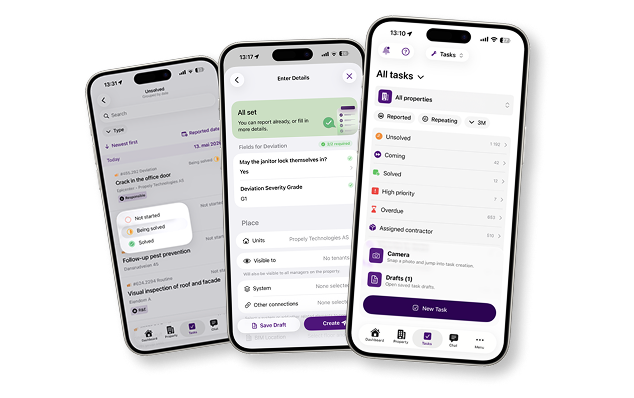
A modern FM system distinguishes between several task types, and it is important to understand the difference in order to set up an efficient and automated workflow.Deviations (enrolled assignments) Deviations are the most common type. A discrepancy is a reported problem if something is not working properly. Deviations can be reported by operations personnel directly in the app, from tenants via a tenant portal, or via a form with a QR code. In Propely is Deviations one of the default task types, and they appear as enrolled tasks in the overview.Routine tasks (repetitive tasks)Routines are scheduled tasks that are repeated at a fixed frequency, such as daily, weekly, monthly, or by the wheel of the year. In Propely is Routine task the second default task type, and these are automatically generated from a routine setup. It is important to distinguish between the routine itself, which is a template and a layout, and the task, which is the concrete action generated from the routine.Internal tasksInternal tasks are performed by the operating organization's own personnel: janitors, operations technicians or coordinators. These can apply to anything from technical checks to cleaning and flag days.External tasksAdditional tasks are assigned to suppliers and subcontractors outside the organization. In Propely, vendors can receive and update tasks via e-mail with guest access, without the need for a full login to the system.Form Generated TasksThese are automatically created from completed forms. Tenants and vendors can fill out custom forms via email or QR code, and the answer is automatically converted into a task in the system.Custom Task TypesThis is a flexible option for organizations with special needs. Administrators can create their own task types, such as HSE discrepancies, move-in protocols, or internal control tasks. These can be displayed in the general task overview, or on a completely separate dedicated page in the side menu. It is also possible to control which roles (landlord, tenant or supplier) should have access to view and create different task types.
Reactive task management means that you react to problems after they have occurred. Preventive task management means planning and performing maintenance until something goes wrong.
Most operating organizations today operate in a mixture of both, but with the help of automation in the work of the FM documentation, it is possible to tilt the balance over towards the preventive. When periodic tasks are set up once in the system and repeated automatically, you ensure that nothing falls between two chairs. No emails that are forgotten, no verbal messages that are not documented.
Tasks can be created in several ways in Propely, depending on the situation and who is submitting.
Manual creationYou can easily create tasks on the Task page in Propely where you select the task type, property and any tenant unit. Next, specify responsible, executor and supplier, set deadline and priority, and add description, attachment and checklist as needed. You can also control visibility over who will see the task: internals only, all tenants on the property, or tenants on a specific unit. Tasks can also be linked to other tasks, service agreements or documentation collections, so you always have a clear red thread in your system.
From deviations and formsHere tasks are created automatically when someone reports a problem via portal, app or QR code. The system notifies the appropriate responsible immediately.
From routine setupHere you set up the routine once, and Propely generates the tasks automatically according to the frequency you have chosen. See more about this below.
Beyond the routines, there are several automation mechanisms that reduce manual handling:
Routines generate tasks automatically A routine is a template work that tells the system when and how often a specific task should be created (daily, weekly, monthly, or by the year wheel). You set up your routine once with frequency, responsible, checklists and completion requirements, and Propely takes care of the rest.
Propely AI processes service reports automatically Providers send service reports to a dedicated email address. Propely AI reads the documents, identifies the right supplier and responsible, detects discrepancies and creates follow-up tasks, without anyone having to do this manually.
Forms are automatically converted to tasks Custom forms are sent via email or QR code to tenants and vendors. The answers end up directly in the system as new tasks with all the information intact.
The annual wheelGet a structured overview of all periodic routines and statutory controls throughout the year. Propely delivers a ready-made framework with best practices, where tasks are created, deployed and documented automatically at the right time.
Automatic alerts and remindersNotifications are sent when deadlines approach, so that nothing is forgotten either by operations personnel, suppliers or tenants.
Deviation management and task management are two sides of the same issue. A discrepancy is a reported problem and something that is not working properly. The task is the action taken to solve it. In Propely, these are always interconnected: the deviation triggers the task, and both are logged with a timestamp, responsible and history.
The entire process from “someone discovers a problem” to “the problem is fixed and documented” is brought together on one platform.
FM documentation is required by law in Norway and constitutes the aggregate history of all activity on a building. With automated task management, documentation occurs on an ongoing basis and by itself:
This is critical information in supervision, insurance events and property sales, and it is data that builds up automatically when the system is used in everyday life.
Property managers using Propely typically experience shorter response times to tenant notices because discrepancies instantly convert into tasks and alert the right person. The technicians spend less time finding information and more time on actual work. The FM history builds up automatically in line with everyday operations. And over time, more planned and preventative maintenance results in lower operating costs compared to costly emergency repairs.
What is the difference between a work order and a task?The term varies between systems and organizations. In Propely is used tasks and is an action to be carried out, documented and followed up.
What is the difference between a routine and a task in Propely? A routine is a setup and template that tells the system when and how often a task should be created. The task is the concrete action that is generated from the routine and shows up in the task overview.
Can tasks be created automatically from tenant inquiries?Yep. Tenants can report discrepancies via portal or QR code, and the system automatically creates a task, assigns responsible and sends notification.
Can you have different types of tasks for different purposes? In addition to the default Variance and Routine Task types, administrators can create custom task types, such as HSE anomalies or move-in protocols with their own fields and visibility settings.
Can providers use the system without a full login?Yep. Providers can receive and update tasks via email without logging in to Propely, and send service reports directly to the AI inbox for automatic processing.
What is FM documentation and why is it important? FM stands for facility management. The FM documentation is the aggregate history of all activity on a building, and is required by law. A good system saves all task and deviation history automatically.
Is Propely integrable with other systems? Propely has open APIs and works with partners in finance, energy monitoring, sensor technology, fire protection and rental management.
How does Propely ensure that no tasks are forgotten? A holistic dashboard gives you an overview of all open and ongoing tasks. The system sends automatic alerts when deadlines are approaching, and periodic routines that are set up once will be repeated automatically if desired.